Video content has become one of the most effective ways to communicate, promote brands and entertain audiences. From films and advertisements to YouTube videos, social media reels and corporate presentations, professional editing and compositing play an important role in shaping the final visual experience.
The Editing and Compositing Course with AI at Arena Animation Salt Lake helps aspiring creative professionals learn video editing, visual effects, colour correction, sound synchronisation and digital compositing. The course also introduces students to AI-assisted tools that can make creative workflows faster, smarter and more efficient.
What Is Video Editing?
Video editing is the process of selecting, arranging and improving video clips to create a clear and engaging story. An editor controls the flow, timing, pace and emotional impact of the final video.
Professional video editing involves more than simply joining clips together. Editors work with:
- Shot selection
- Scene sequencing
- Transitions
- Background music
- Sound effects
- Voiceovers
- Titles and graphics
- Colour correction
- Visual pacing
- Story structure
A skilled video editor understands how to maintain the viewer’s attention and communicate the intended message effectively.
What Is Digital Compositing at Arena Animation Salt Lake?
Digital compositing is the process of combining multiple visual elements into a single final image or video scene. These elements may include live-action footage, photographs, backgrounds, computer-generated objects, text, animation and visual effects.
Compositing is widely used in:
- Films
- Television programmes
- Advertisements
- Music videos
- Web series
- Social media content
- Product videos
- Green-screen productions
- Visual-effects sequences
- Motion graphic projects
A compositor ensures that all visual elements appear naturally integrated within the same scene.
Why Learn Editing and Compositing with AI?
Artificial intelligence is changing the way videos are edited and produced. AI-powered tools can automate repetitive tasks, improve footage and assist creators during different stages of production.
AI can help editors and compositors with:
- Automatic subtitle generation
- Background removal
- Object selection
- Video enhancement
- Noise reduction
- Audio cleanup
- Scene detection
- Colour matching
- Image generation
- Motion tracking assistance
- Content resizing
- Visual concept development
AI can save time, but it cannot replace creativity, storytelling or artistic judgement. A professional editor must understand rhythm, emotion, continuity and audience engagement. Similarly, a compositor must understand lighting, perspective, colour and visual realism.
The course focuses on combining these fundamental skills with modern AI-assisted workflows.
What Will Students Learn?
The Editing and Compositing Course with AI introduces students to the creative and technical processes involved in post-production.
Fundamentals of Video Editing
Students begin by understanding the basic principles of editing and visual storytelling.
Important topics may include:
- Types of shots
- Camera angles
- Continuity editing
- Timeline management
- Cutting techniques
- Story sequencing
- Rhythm and pacing
- Transition selection
- Narrative structure
- Project organisation
These fundamentals help students create videos that feel organised, engaging and meaningful.
Non-Linear Video Editing
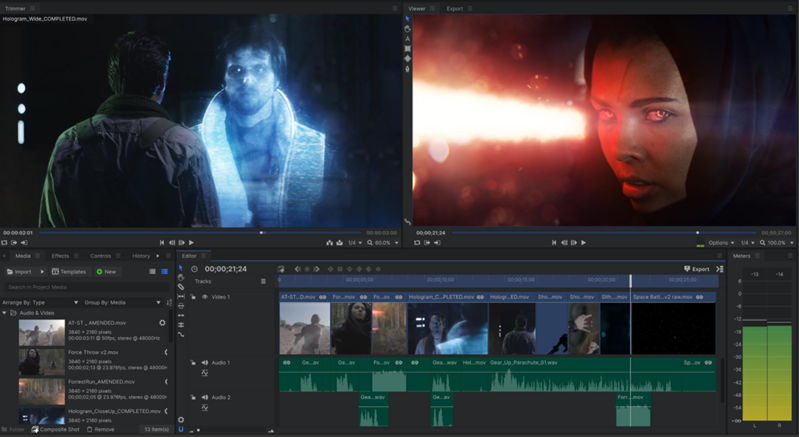
Modern editing software allows editors to arrange video clips without changing the original footage. This process is known as non-linear editing.
Students may learn how to:
- Import and organise footage
- Create sequences
- Trim and arrange clips
- Work with multiple video layers
- Add transitions
- Synchronise audio and video
- Create titles and captions
- Export videos in different formats
- Prepare videos for social media
- Manage professional editing projects
Audio Editing and Sound Design
Audio has a major influence on the quality of a video. Clear sound, suitable background music and properly timed effects can make the final content more engaging.
Students may work with:
- Voiceover editing
- Background music
- Sound effects
- Audio transitions
- Noise reduction
- Audio synchronisation
- Volume balancing
- Dialogue enhancement
- Sound mixing
AI-assisted audio tools can help remove background noise, improve voice clarity and generate automatic transcripts.
Colour Correction and Colour Grading
Colour correction helps maintain consistency between different video clips, while colour grading creates a particular mood or visual style.
Students may learn:
- Exposure correction
- White balance adjustment
- Contrast control
- Saturation correction
- Skin-tone correction
- Colour matching
- Mood creation
- Cinematic colour styles
- Shot-to-shot consistency
Colour grading can transform ordinary footage into a visually appealing and emotionally powerful sequence.
Green-Screen Compositing
Green-screen technology allows creators to replace a plain background with a different image, video or digital environment.
Students can learn techniques such as:
- Chroma-key removal
- Edge refinement
- Background replacement
- Spill removal
- Colour matching
- Light adjustment
- Shadow creation
- Foreground and background integration
The objective is to create a final result in which the subject appears naturally placed within the new environment.
Rotoscoping and Masking
Rotoscoping involves separating a person or object from the background frame by frame. Masking is used to hide, reveal or isolate specific parts of a visual.
These techniques are useful for:
- Object removal
- Background replacement
- Visual-effects integration
- Selective colour correction
- Character isolation
- Scene cleanup
- Creative transitions
AI-assisted selection and masking can speed up the process, but manual refinement is often required for professional results.
Motion Tracking
Motion tracking helps attach text, graphics or visual effects to a moving object within a video.
Students may learn how to track:
- Faces
- Screens
- Vehicles
- Products
- Camera movement
- Environmental objects
Motion tracking is commonly used in advertisements, films, product videos and screen-replacement projects.
Visual Effects and Scene Integration
Compositing allows artists to create scenes that may be difficult or impossible to capture in real life.
Students may work with:
- Smoke and fire effects
- Light effects
- Screen replacement
- Object removal
- Background extensions
- Camera shake
- Atmospheric effects
- Digital particles
- Image integration
- Multi-layer compositions
Successful visual effects should support the story without looking separate from the original footage.
How Is AI Used in Editing and Compositing?
AI can support different stages of the post-production workflow.
Automatic Scene Detection
AI can identify changes between scenes and divide long footage into separate clips. This helps editors organise content more quickly.
Subtitle and Transcript Generation
AI can convert speech into text, generate subtitles and assist with video accessibility. Editors must review the generated text to correct errors and maintain proper timing.
AI-Assisted Background Removal
Some AI tools can separate people or objects from their backgrounds without using green screens. This can be useful for social media videos, presentations and quick promotional content.
Video and Image Enhancement
AI can assist with:
- Increasing image clarity
- Reducing visual noise
- Stabilising shaky footage
- Improving low-resolution visuals
- Restoring old footage
- Enhancing facial details
Generative Visual Assets
AI-generated images and backgrounds can be used as initial creative assets for compositing projects. Designers should refine these assets and ensure that they match the project’s lighting, perspective and visual style.
Automatic Content Resizing
Videos often need to be adapted for different platforms. AI tools can help reframe content for landscape, square and vertical formats.
Practical Projects and Portfolio Development
Practical assignments help students understand professional editing and compositing workflows. A strong portfolio allows learners to demonstrate their creativity, technical knowledge and storytelling abilities.
Portfolio projects may include:
- Social media reel editing
- Promotional advertisement
- Music video edit
- Product video
- Short-film sequence
- Green-screen composition
- Screen-replacement project
- Colour-grading project
- Visual-effects scene
- Motion-tracking video
- AI-assisted video campaign
- Corporate presentation video
- YouTube intro and promotional content
Students can present both the final output and the process used to create each project.
Career Opportunities after the Course
After developing the required skills and creating a professional portfolio, students can explore opportunities in production houses, animation studios, advertising agencies, television channels, digital marketing companies and media organisations.
Possible career profiles include:
- Video Editor
- Compositing Artist
- Post-Production Artist
- Rotoscopy Artist
- Visual Effects Artist
- Colourist
- Motion Graphic Designer
- Social Media Video Editor
- Digital Content Creator
- Assistant Editor
- Junior Compositor
- AI-Assisted Video Creator
Students may also work as freelancers for brands, content creators, production companies and digital agencies.
Who Can Join the Course?
The Editing and Compositing Course with AI can be suitable for:
- Students after completing school
- College students
- Aspiring video editors
- Filmmaking enthusiasts
- Social media content creators
- Graphic designers
- Motion graphic learners
- Digital marketing professionals
- Freelancers
- Working professionals seeking creative skills
Previous editing experience may not always be necessary. Interest in storytelling, cinema, technology and visual creativity can provide a strong starting point.
Why Choose Arena Animation Salt Lake?
Arena Animation Salt Lake offers a creative learning environment where students can understand post-production concepts and apply them through practical assignments.
Students can benefit from:
- Guidance from experienced faculty members
- Practical and project-based learning
- Exposure to industry-relevant software
- Training in editing and compositing fundamentals
- Introduction to AI-assisted creative tools
- Portfolio-development support
- Creative classroom activities
- Opportunities to work on different video projects
The focus is not limited to learning software commands. Students are encouraged to understand storytelling, visual continuity, composition and professional production workflows.
Build a Creative Career in Post-Production
Editing and compositing are essential parts of film, advertising, digital marketing and online content creation. As AI continues to influence the creative industry, professionals who understand both traditional post-production techniques and AI-assisted workflows can become more adaptable and efficient.
The Editing and Compositing Course with AI at Arena Animation Salt Lake helps students build creative, technical and storytelling skills through practical learning. From video editing and sound design to green-screen compositing and visual effects, learners can explore different areas of modern post-production.
Start your creative journey and develop future-ready editing and compositing skills with AI at Arena Animation Salt Lake.